For every customer, the WooCommerce product pages show the same options regardless of what they are actually buying and what they have already selected. A customer ordering a simple product sees the same additional fields as someone ordering a complex, customizable one.
That approach works when the product range is simple, but it creates a cluttered and confusing experience the moment products have any meaningful variation in what the customer needs to configure.
Conditional logic changes this by making product options respond to what the customer is doing in real time. Fields appear when they are relevant and stay hidden when they are not and the result is a product page that feels like it was designed for each specific customer rather than built once and applied to everyone.
Table of Contents
What Conditional Logic Actually Does on a Product Page
The core idea is actually pretty straightforward once you realize that a field or option becomes visible only when a condition is met. It may also happen if the customer has already selected or entered something. And vice versa, if a condition is not met, the field remains hidden, keeping the page clean.
A practical example makes this clearer. A store selling custom t-shirts might have a checkbox asking whether the customer wants personalized text added. If the customer checks yes, a text input field appears asking for the text they want. If they leave the checkbox empty, the text field never appears at all. The customer who does not want personalization never sees a field that has nothing to do with their order.
What we noticed is that this kind of dynamic behavior changes how customers engage with product pages. They see fewer irrelevant options, which makes the page feel less overwhelming, and the options they do see feel contextually appropriate, which makes them more likely to engage with them rather than scroll past.
Where Conditional Logic Makes the Biggest Difference
Not every product needs conditional logic but certain product types benefit from it significantly:
- Customizable or personalized products where some customers want engraving, printing, or custom text and others do not
- Products with configuration dependencies where selecting one option makes certain other options relevant that would otherwise be unnecessary
- Service-based products where the information needed from the customer depends on the specific service selected
- Products with optional add-ons where the add-on options only make sense in the context of certain product configurations
- B2B products where trade customers need different information fields from retail customers
Solutions Available for Adding Conditional Logic to WooCommerce
Using WooCommerce Blocks and Native Fields
WooCommerce does not include conditional logic for product options natively. The default product page supports variations through the attribute and variation system but there is no built-in way to show or hide additional fields based on customer input. For very simple cases some themes include basic conditional behavior through custom templates but this is limited and requires developer involvement to set up and maintain.
Code-Based Approaches
Developers can implement conditional logic using JavaScript and WooCommerce hooks. The general approach involves adding custom fields through WooCommerce action hooks, using jQuery or vanilla JavaScript to monitor field changes and show or hide dependent fields, and saving the field values as order meta when the product is added to the cart.
This works and gives precise control over the behavior but it requires ongoing maintenance, is not manageable by non-technical staff, and needs to be updated whenever WooCommerce changes its frontend structure. For stores with complex or frequently changing product option requirements, the code maintenance overhead becomes significant over time.
Using a Dedicated Product Addons Plugin
This is where most stores land once they have tried the alternatives and found their limitations. A dedicated WooCommerce product addons plugin with built-in conditional logic handles everything through a visual interface without requiring any code and gives non-technical store managers the ability to build and update conditional option structures independently.
How the Product Addons Plugin by Extendons Handles This
The Product Addons plugin by Extendons is built specifically for adding configurable options to WooCommerce products and conditional logic is one of its core capabilities rather than an afterthought feature.
The setup works through a visual rule builder where conditions are defined by selecting a field, choosing a comparison, and specifying the value that triggers the condition. No code required at any point.
Field types available for building conditional structures
- Text fields and text areas for customer input
- Dropdown menus for selecting from a list of options
- Checkboxes for yes or no selections and multi-select options
- Radio buttons for single-choice selections
- File upload fields for designs, logos, or reference images
- Date pickers for delivery or appointment scheduling
- Color pickers for product customization
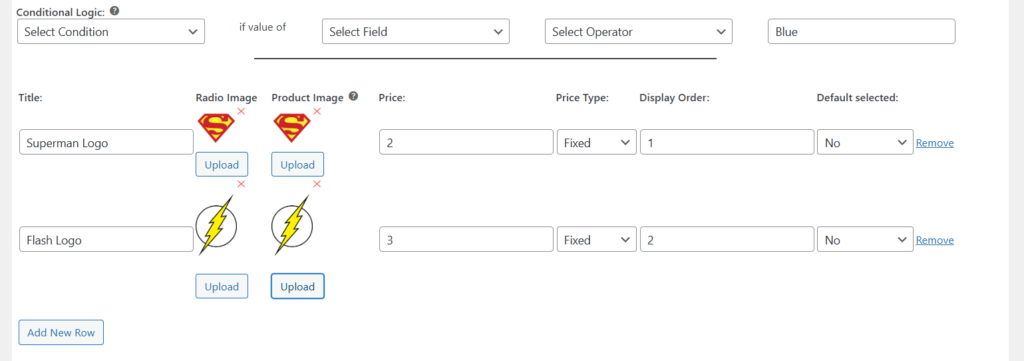
Any of these can be both a trigger for a condition and a field that appears or disappears based on a condition, which means the logic can be layered into fairly complex configurations without becoming difficult to manage.
A practical setup example
A store selling custom business cards might configure their product options like this:
- A dropdown asking whether the customer wants single-sided or double-sided printing
- If double-sided is selected a second file upload field appears asking for the back design
- A checkbox asking whether the customer wants a premium finish
- If premium finish is checked a dropdown appears offering matte, gloss, or soft touch options
- A checkbox for rush delivery
- If rush delivery is checked a date picker appears asking for the required delivery date
None of these secondary fields appear unless the relevant primary option is selected. A customer ordering a basic single-sided card with standard delivery sees a clean simple form. A customer with more complex requirements sees everything they need appear progressively as they make their selections.
Pricing tied to conditional options
What we think is particularly useful about the product add ons WooCommerce implementation in this plugin is that pricing can be attached to conditional fields. When a conditional option becomes visible and the customer selects or fills it in, the additional cost is added to the product price automatically. So the premium finish option above could carry an extra charge that only appears when the customer selects that finish and is never shown to customers who do not need it.

This makes conditional logic not just a UX feature but a revenue tool because customers are presented with relevant upsell options at exactly the right moment in their product configuration rather than seeing every possible add-on regardless of context.
Setting Up Conditional Logic in the Plugin
The process is straightforward enough that non-technical store managers can handle it without developer involvement:
- Go to the product you want to configure and open the Product Addons section in the product data area
- Add the fields you want to include on the product page, setting labels, field types, and any pricing
- For each field that should be conditional, find the conditional logic section within that field’s settings
- Set the condition by selecting which field triggers the visibility, what comparison to use, and what value triggers the display
- Save the product and test the behavior on the frontend by working through the options as a customer would
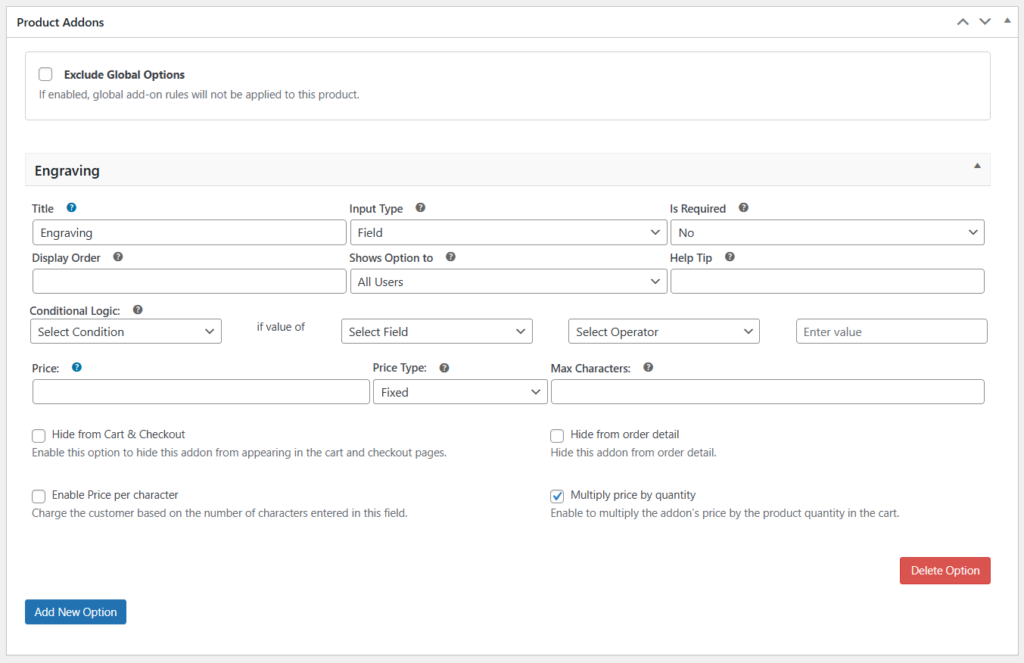
The visual nature of the setup means you can see the logic structure clearly, rather than trying to follow conditional behavior through code, which also makes it easier to update when product options change.
A Few Things Worth Getting Right
Conditional logic improves the product page experience when it is used thoughtfully. A few practices consistently produce better results:
- Test every path a customer might take, not just the most common one. Edge cases in conditional logic are easy to miss during setup and frustrating for customers to encounter
- Keep the logic as simple as the product actually requires. Conditional structures that become very deep or complex can be confusing to maintain and occasionally produce unexpected behavior when multiple conditions interact
- Label fields clearly so the relationship between a trigger field and the fields it reveals is intuitive to the customer. If selecting an option causes new fields to appear, those fields should feel like a natural next step rather than a surprise
- Review the logic when products change. Conditional option structures that made sense for a previous version of a product can produce incorrect behavior after a product update if the options or their relationships have changed
Conclusion
Conditional logic turns a static product options form into something that responds intelligently to what each customer actually needs. It reduces the clutter of irrelevant fields, makes the purchase flow feel more considered, and creates opportunities to surface relevant add-ons and pricing at exactly the right moment.
For WooCommerce stores that offer products with any meaningful configuration complexity, getting conditional logic in place through a dedicated WooCommerce product addons plugin is one of the more impactful product page improvements available without custom development.
The Product Addons plugin by Extendons handles the full setup through a visual interface and gives store managers the ability to build and maintain conditional option structures without developer involvement every time something needs to change.