Here’s a question every WooCommerce store owner should ask: “Why do first-time visitors get the same discounts as your most loyal customers?”
In fact, treating every customer the same is one of the most common reasons WooCommerce promotions underperform.
The first-time customers:
- They don’t know your brand yet.
- They haven’t purchased before.
- And they haven’t earned that reward.
Yet in many stores, they receive exactly the same deals as VIPs, members, or wholesale buyers.
But now, your WooCommerce store already knows a lot about your customers. Your store knows who’s a guest, who’s a registered customer, who buys in bulk, and who comes back every month. But WooCommerce’s default coupon system doesn’t know what to do with that information.
In this guide, we’ll show you how to create restricted WooCommerce discount coupons based on user roles using YayPricing, so your promotions finally align with how different customers engage with your store.
Table of Contents
Why User Role – Based Discounts Are a Smart Strategy?
User roles are more than just labels – they represent relationships.
They tell you: who trusts your brand, who buys regularly, who needs encouragement, who deserves exclusivity?
When you use user roles in your discounts, you can:
- Reward loyal customers without giving away profit
- Offer special pricing to members or subscribers
- Keep wholesale and retail pricing separate
- Encourage guest users to create an account
- Stop coupons from being shared publicly
Doing things like that helps your store retain loyal customers and give new customers a warm welcome. These offers make them feel earned, not random, and customers notice.
Unfortunately, WooCommerce’s built-in coupons can’t properly target user roles. There’s no clean way to say “this discount is only for these users.”
That’s where YayPricing becomes essential.
YayPricing: Control Discounts Based on Real Shopping Conditions
YayPricing is a WooCommerce pricing and discount plugin designed for store owners who want to run rule-based promotions without dealing with complex logic or custom code. Instead of creating one coupon and hoping it works for everyone, YayPricing lets you build discounts around real conditions: who your customers are, what they buy, and how they shop.
With YayPricing, you’re not limited to WooCommerce’s basic coupon rules. You can create flexible pricing strategies based on:
- User roles (customers, members, wholesalers, etc.)
- Products, variations, or categories
- Cart value and quantity
- Time schedules and campaigns
- Combined conditions that work together
Everything is managed through a clean, visual rule builder, so you always understand what’s happening. You don’t need to write code, install multiple plugins, or rely on confusing workarounds. If you can explain the promotion in plain words, you can build it in YayPricing.
Most importantly, YayPricing helps you move away from “discount everything” thinking. Instead, you create intentional promotions that reward the right customers, protect your margins, and build stronger long-term relationships.
If you want your WooCommerce discounts to feel professional, strategic, and easy to manage, YayPricing gives you the tools to do exactly that.
How to Set Up Restricted WooCommerce Discount Coupons Based on User Role?
Step 1: Install and Activate YayPricing
First things first, install and activate the Pro version of YayPricing, which includes advanced conditions for coupons based on user role targeting.
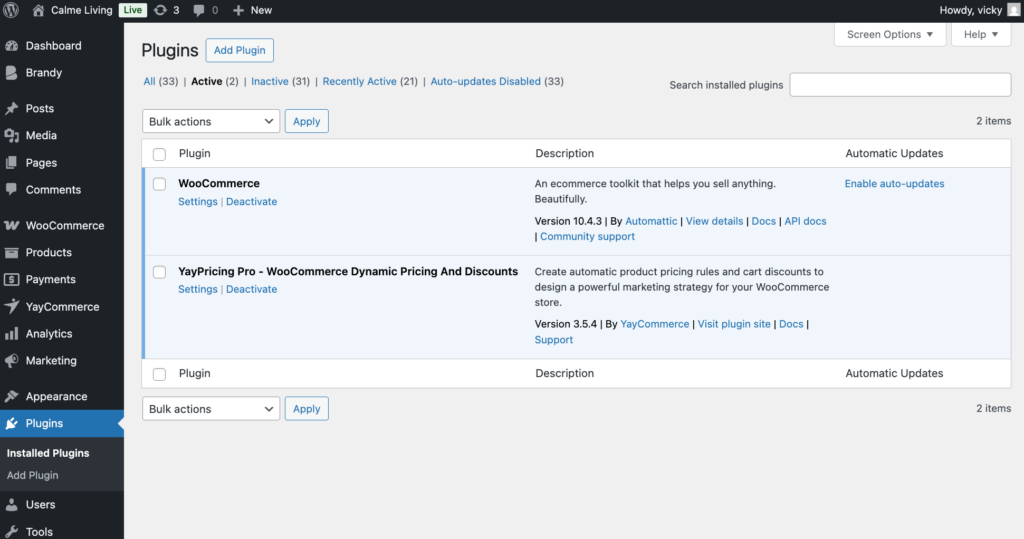
Once activated, you’ll see YayPricing under the WooCommerce menu in your WordPress dashboard.
Step 2: Create a Pricing Rule for a Coupon Campaign
Now, head to WooCommerce > YayPricing and create a new pricing rule.
Let’s say your campaign is simple: “15% OFF only for registered customers.”
If you already have a WooCommerce coupon created with a discount value of 0, that’s perfect. YayPricing will handle the real discount logic, so we will create a rule as 15% discount.
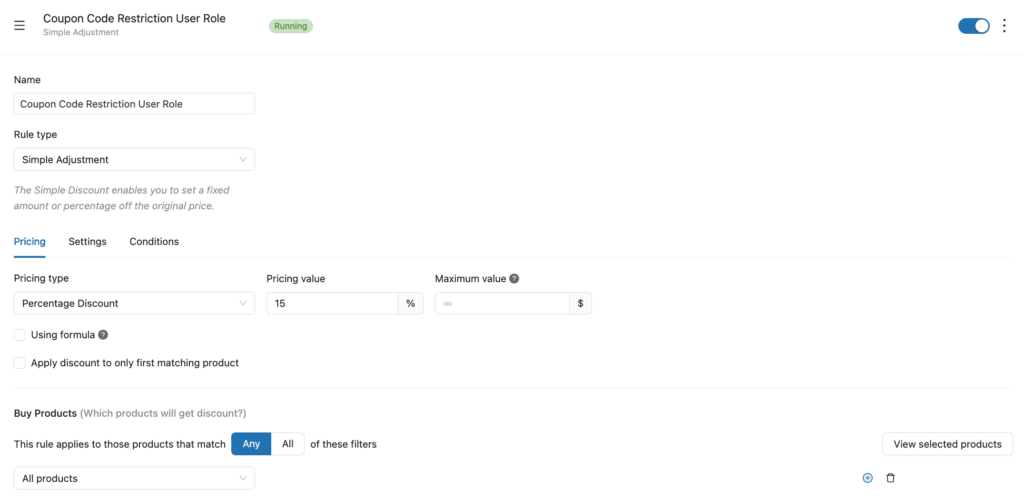
Then, still on the YayPricing dashboard, slide to the conditions tab to assign the pricing rule to your coupon code.
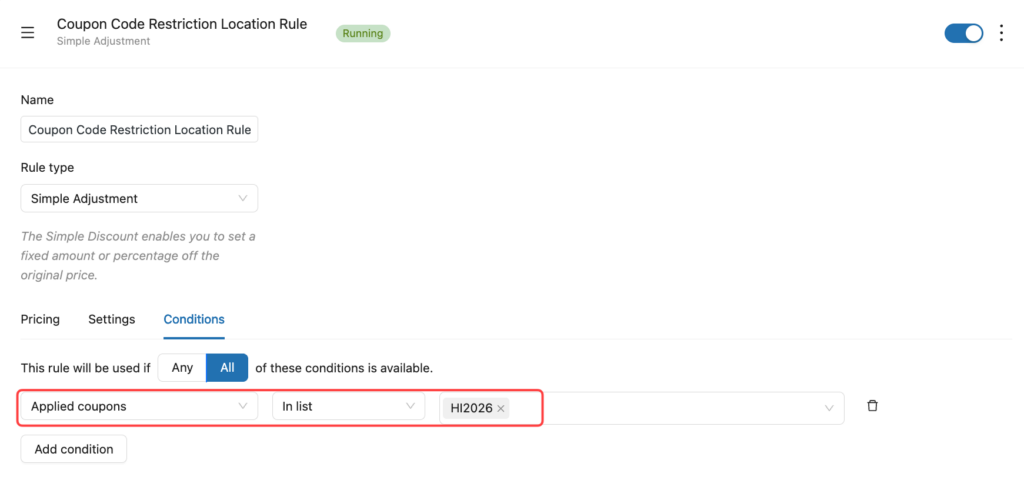
This setup keeps your coupon system organized while giving you full flexibility.
Step 3: Add the User Role Condition
Still configure on the Conditions tab, now this is when the magic happens.
Here, select User Role as the condition type. With 20+ conditional logic of YayPricing, you can choose one or multiple roles, such as: Customer, Subscriber, Wholesale, Member, or any custom role created by other plugins.
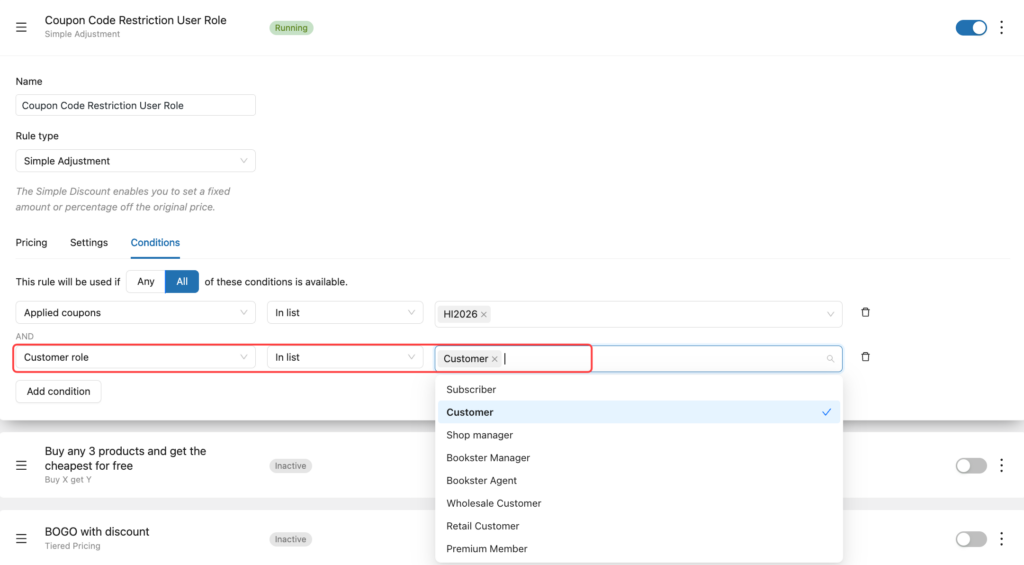
Once saved, the coupon will only apply when the logged-in user matches the selected role. Guest users or other roles will not receive the discount.
Step 4: Make the Discount Feel Obvious (and Fair)
A good discount shouldn’t feel hidden. You should let your customers clearly know about your special deal for them, which makes them trust your WooCommerce store.
With YayPricing, you can:
- Hide discounts from guests
- Show discount messages only to eligible users
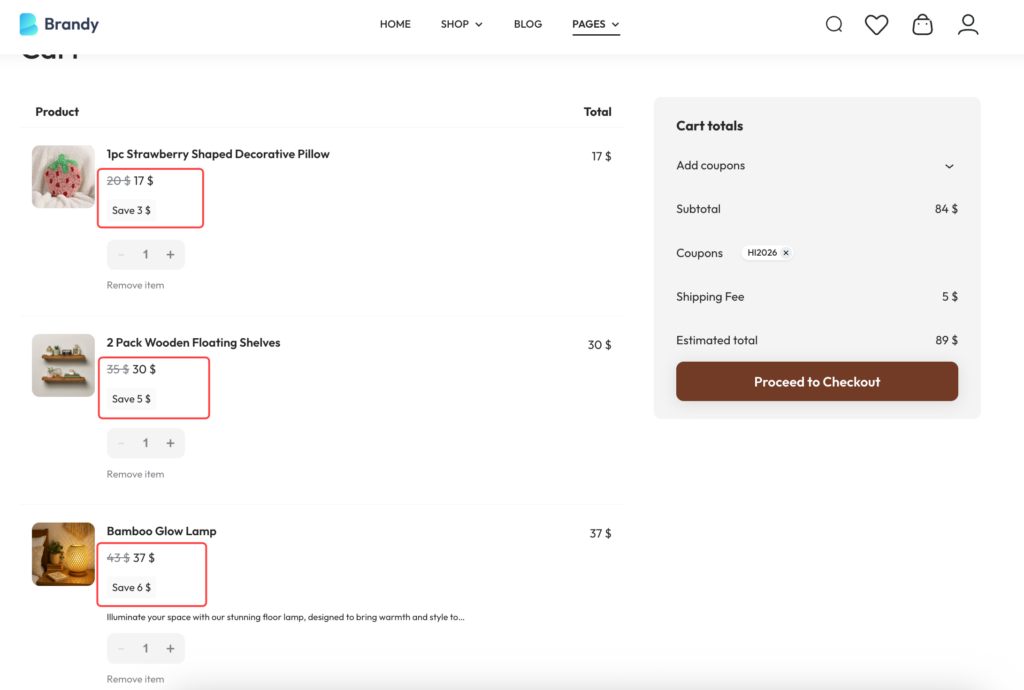
- Update prices instantly in the cart
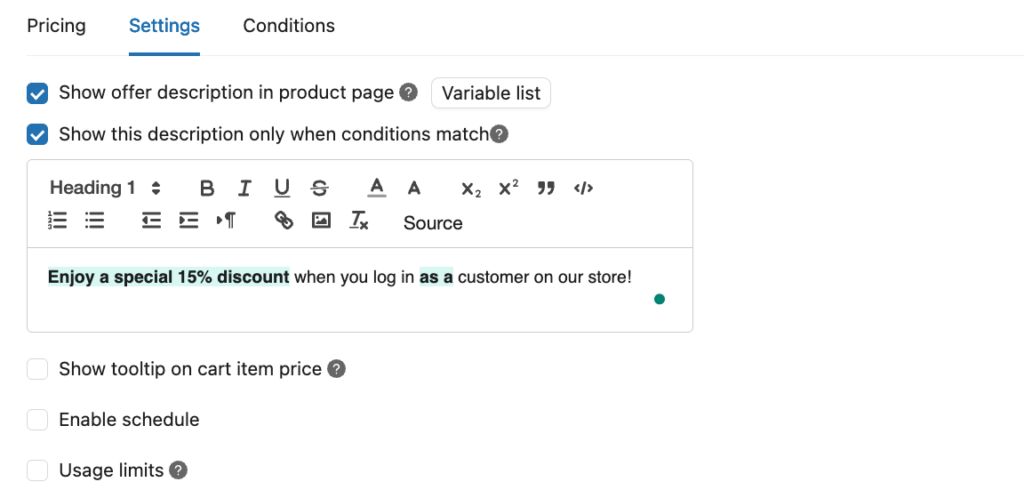
This turns your discount into a conversion tool, not just a price cut.
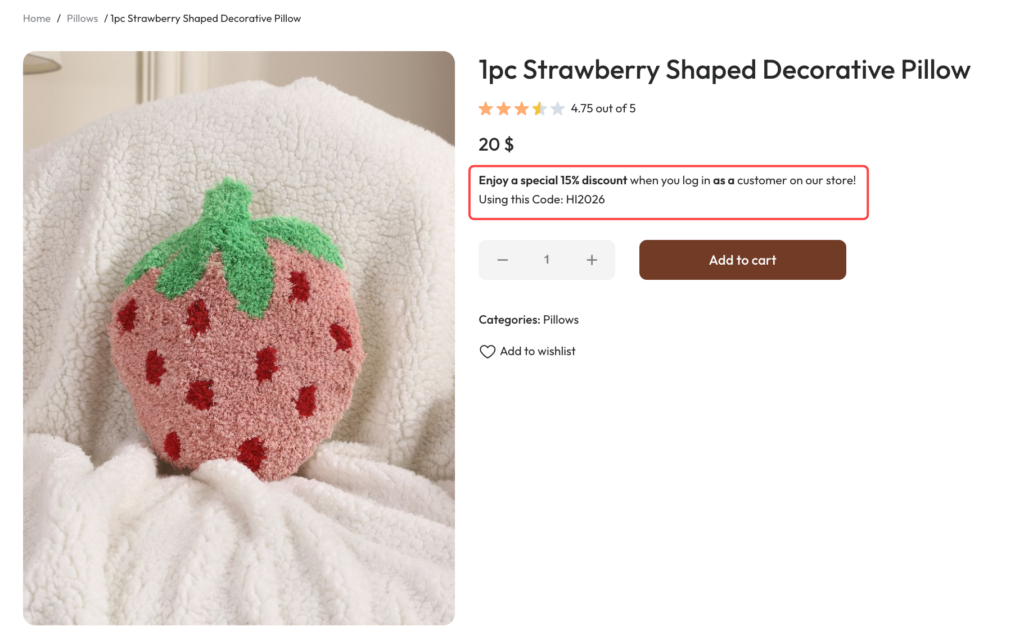
Step 5: Test It Like a Real Customer
Once you’re done with everything, let’s make a real purchase as a customer on your WooCommerce store to see how this rule works.
Frequently Asked Questions
- Can I use one coupon for multiple roles?
Yes. With the condition feature of YayPricing, you can apply the same discount to multiple roles if needed – perfect for member tiers.
- What happens if a guest enters the coupon?
Nothing breaks. If the user is not logged in or doesn’t match the required role, the discount will not apply. That’s exactly the point we want to set up.
- Can role-based discounts be scheduled?
Absolutely. By using the schedule feature of YayPricing, you can define start and end dates for your discount rules, perfect for:
- Member-only sales
- Limited-time VIP offers
- Seasonal loyalty campaigns
User role–based discounts are one of the most effective ways to reward loyal customers, protect wholesale pricing, and personalize your WooCommerce store.
With YayPricing, you can set up role-specific discount rules in minutes – no coding, no complexity.
Create User Role-Based Discounts with YayPricing
If you’re building advanced discount strategies, these related guides will help you go even further:
- How to Set Up Restricted WooCommerce Discount Coupons Based on Advanced Quantity
- How to Display Multiple Sales Countdown Banner in WooCommerce
- How to Set Up Different Prices for Different Customers in WooCommerce
Want to explore more WooCommerce growth strategies? These YayCommerce resources are designed to help: YouTube, Facebook. These resources are especially useful if you’re managing complex stores or multiple customer segments.
Final Thoughts
When everyone gets the same coupon, it stops being a reward and starts feeling like a clearance sale. But when a discount is tied to who the customer is, a loyal buyer, a registered member, or a wholesale partner, it suddenly feels meaningful.
That’s the real power of user role-based discounts.
Instead of giving away margin to every visitor, you can:
- Say “thank you” to customers who come back again and again
- Create real benefits for members and subscribers
- Keep wholesale pricing protected from retail shoppers
- Encourage guest users to sign up and become part of your store
And the best part? You don’t need complicated setups or technical knowledge to do any of this.
With YayPricing, everything is clear and predictable. You decide who gets the discount, when it applies, and under what conditions. Your customers get a smoother experience, and you get more control over your promotions.
If you’re new to this strategy, start small. Try one simple campaign, like a discount for logged-in customers only, and watch how it changes customer behavior. Once you see the results, you’ll naturally find more ways to use user role-based discounts to grow your store.